Automating Customer Support Ticketing Using AI Chatbots
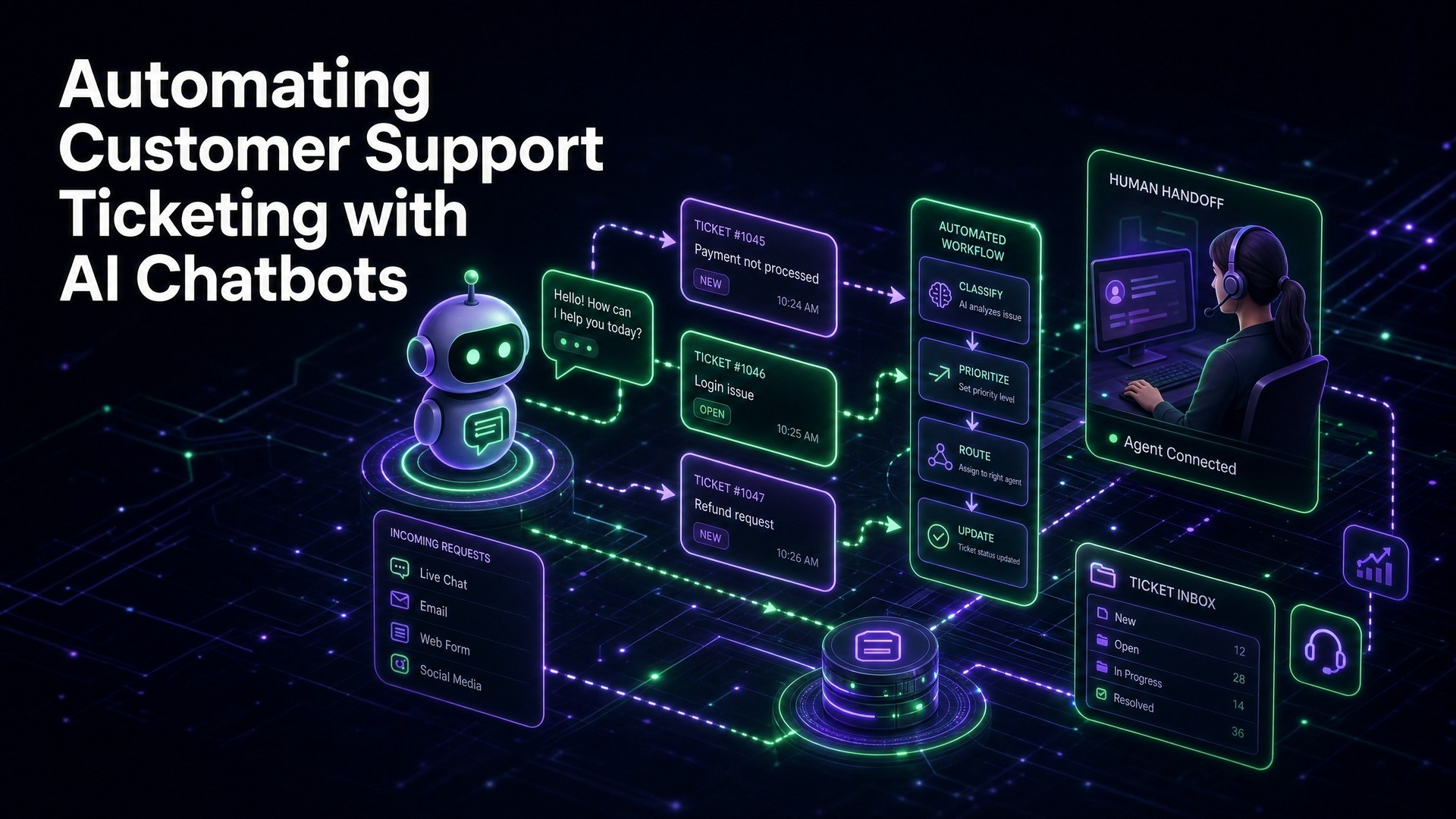
In today's fast-paced digital landscape, customer expectations are higher than ever. Businesses are under immense pressure to deliver instant, accurate, and personalized support. Traditional customer support models, heavily reliant on manual processes, often struggle to keep up, leading to frustrated customers and overburdened support teams. The solution? Strategic integration of AI chatbots to automate customer support ticketing.
The Problem with Traditional Ticketing Systems
Traditional customer support ticketing systems, while foundational, often present significant challenges that hinder efficiency and customer satisfaction. The core issues stem from their reliance on human intervention for nearly every step of the support process.
Firstly, high ticket volumes lead to inevitable backlogs. As inquiries pour in through various channels – email, phone, web forms – agents can quickly become overwhelmed. This results in extended wait times, pushing customers to seek answers elsewhere or, worse, to competitors.
Secondly, inefficient triaging and routing are common pitfalls. Manual assessment of each incoming ticket to determine its category, priority, and the appropriate department or agent takes valuable time. Misrouted tickets further delay resolution, requiring additional transfers and explanations from the customer.
Thirdly, repetitive inquiries consume a disproportionate amount of agent time. A significant percentage of support requests are often for frequently asked questions (FAQs) or simple troubleshooting steps that don't require complex human analysis. Agents repeatedly answering the same questions leads to monotony, burnout, and diverts their attention from more complex, high-value issues.
Finally, inconsistent response quality can arise from varying agent experience levels and a lack of standardized answers. This impacts brand perception and can erode customer trust over time. These systemic issues not only inflate operational costs but also directly impact customer satisfaction, making a strong case for automation.
How AI Chatbots Transform Ticket Management
AI chatbots are not just simple automated responders; they are sophisticated tools that can fundamentally alter the landscape of ticket management. By leveraging natural language processing (NLP) and machine learning (ML), these chatbots can intelligently interact with customers, triage issues, and even resolve a significant portion of inquiries without human intervention.
The transformation begins with instantaneous first-line support. When a customer initiates contact, the chatbot immediately engages, providing a rapid response that traditional systems cannot match. This eliminates wait times for common queries, significantly improving the initial customer experience.
Chatbots excel at intelligent ticket deflection. By accurately understanding the customer's intent and question, they can provide immediate answers to FAQs, guide users through self-service resources, or offer solutions from a knowledge base. This proactive approach prevents a substantial number of inquiries from ever becoming formal tickets, drastically reducing the workload on human agents.
For issues that do require human intervention, AI chatbots perform advanced pre-qualification and routing. They can gather crucial information upfront – customer details, issue type, urgency, relevant context – before handing off to a human agent. This pre-collected data ensures that when a ticket is created, it is comprehensive and accurately routed to the most qualified agent or department, minimizing transfer times and improving first-contact resolution rates.
Furthermore, chatbots contribute to data collection and analysis. Every interaction provides valuable insights into common customer pain points, emerging issues, and areas where self-service content can be improved. This data can be used to refine chatbot responses, update knowledge bases, and identify systemic problems within products or services.
The Chatbot-to-Ticket Handoff Process Explained
The seamless transition from an AI chatbot interaction to a human-handled support ticket is a critical component of effective customer support automation. This "chatbot-to-ticket handoff" ensures that customers receive appropriate assistance without feeling abandoned by the automated system.
Here's a breakdown of the typical process:
1. Initial Chatbot Engagement: The customer initiates contact, and the AI chatbot begins the interaction, attempting to resolve the query through its knowledge base or by guiding the user.
2. Intent Recognition and Escalation Trigger: The chatbot continuously analyzes the customer's input. If it detects a complex query that it cannot resolve, an emotional cue indicating frustration, or a specific keyword/phrase configured for escalation (e.g., "speak to a human," "urgent issue"), it triggers the handoff protocol.
3. Information Gathering: Before the handoff, the chatbot proactively gathers essential information from the customer. This might include their name, email, account number, a detailed description of the problem, and any troubleshooting steps they've already attempted. This pre-qualification saves the human agent significant time.
4. Ticket Creation: Based on the gathered information and the chatbot's assessment, a new support ticket is automatically created within the integrated ticketing system. All relevant chat history and collected data are appended to this ticket.
5. Intelligent Routing: The ticketing system, often aided by AI, then routes the newly created ticket to the most appropriate human agent or department. This routing can be based on the issue type, customer segment, urgency, or agent availability and expertise.
6. Agent Notification and Context: The assigned human agent receives a notification for the new ticket. Crucially, they are provided with the full transcript of the chatbot conversation and all pre-collected customer data. This context allows them to pick up exactly where the chatbot left off, avoiding the need for the customer to repeat themselves.
7. Human Agent Intervention: The human agent reviews the ticket and the chat history, then takes over the interaction, either by directly contacting the customer (via email, phone, or live chat if available) or by initiating internal processes to resolve the issue.
This structured handoff process ensures that customer issues are never lost, and human agents are empowered with all the necessary information to provide efficient and effective support.
Benefits of a Built-in Ticketing System
Integrating a ticketing system directly into your AI chatbot platform, like QuickWise, offers a multitude of strategic advantages over using disparate systems. This synergy creates a more cohesive and efficient support ecosystem.
1. Seamless Data Flow and Context:
With a built-in system, data moves effortlessly between the chatbot and the ticket. Chat transcripts, customer details, and problem descriptions are automatically attached to the ticket. This eliminates manual data entry, reduces errors, and ensures that human agents always have full context without needing to switch between applications.
2. Centralized Management and Reporting:
All customer interactions, whether resolved by the chatbot or escalated to a human, reside in a single platform. This centralization simplifies management and provides a unified view of support operations. It also enables more accurate and comprehensive reporting on key metrics like ticket deflection rates, resolution times, and agent performance, all from one dashboard.
3. Faster Resolution Times:
The automated creation and pre-population of tickets, combined with intelligent routing, drastically cuts down on the time it takes for an issue to reach the right agent. Agents can jump straight into problem-solving, rather than spending time on data collection or re-triaging, leading to quicker resolutions.
4. Enhanced Agent Efficiency:
Agents spend less time on repetitive tasks like creating tickets, copying chat logs, or asking for basic information. This frees them up to focus on complex, high-value issues that truly require human expertise and empathy, leading to increased job satisfaction and productivity.
5. Improved Customer Experience:
Customers benefit from a smoother experience. They don't have to repeat information when escalated, and their issues are addressed more quickly. The perception of a unified support channel, rather than fragmented systems, contributes significantly to customer satisfaction.
6. Simplified Workflow and Reduced Overhead:
Managing a single platform for both chatbot interactions and ticketing streamlines IT operations and reduces the complexity of integrating and maintaining multiple software solutions. This can lead to lower operational costs and a more agile support infrastructure.
7. Answer Correction System Integration:
A platform like QuickWise, with its integrated answer correction system, directly benefits from a built-in ticketing system. When an agent resolves a ticket, especially one that the chatbot initially struggled with, the correction can be fed back into the chatbot's knowledge base. This continuous learning loop ensures the chatbot's accuracy improves over time, further enhancing deflection rates and self-service capabilities.
This holistic approach transforms customer support from a series of disjointed steps into a fluid, intelligent process.
Steps to Automate Your Ticketing Workflow
Automating your customer support ticketing workflow with AI chatbots doesn't have to be a daunting task. By following a structured approach, businesses can successfully implement and optimize this transformative technology.
1. Define Your Goals and Scope:
Before diving into technology, clearly articulate what you want to achieve. Do you aim to reduce ticket volume by 30%? Improve first-response time by 50%? Identify common pain points and repetitive inquiries. This initial analysis will guide your chatbot's design and functionality.
2. Audit Your Existing Knowledge Base:
A robust and accurate knowledge base is the foundation of an effective AI chatbot. Review and update your FAQs, help articles, and troubleshooting guides. Ensure the information is clear, concise, and easily digestible. The better your knowledge base, the more issues your chatbot can resolve autonomously.